
Memory
The core power of Codebase Intelligence is its ability to learn and remember. This page explains how the Memory Engine works and how it integrates with your existing tools.
The Memory Lifecycle
Section titled “The Memory Lifecycle”- Observation: An event occurs (a bug is fixed, a decision is made)
- Capture: The event is captured either automatically via hooks or manually through the dashboard
- Storage: The observation is stored in the Activity Log (SQLite) and embedded into the Vector Store
- Recall: When a future task matches the semantic context of the memory, it is proactively retrieved and injected into the agent’s prompt
Memory Types
Section titled “Memory Types”| Type | Description | Example |
|---|---|---|
gotcha | Non-obvious behaviors or warnings | ”The API requires basic auth, not bearer token.” |
decision | Architectural or design choices | ”We use polling instead of websockets for stability.” |
bug_fix | Solutions to specific errors | ”Fixed race condition in transaction handler.” |
discovery | Facts learned about the codebase | ”The user table is sharded by region.” |
trade_off | Trade-offs made and their rationale | ”Sacrificed write throughput for read latency.” |
session_summary | High-level summary of a coding session | ”Implemented user login flow.” |
Auto-Capture Hooks
Section titled “Auto-Capture Hooks”OAK CI automatically installs hooks into supported agents during oak init. No manual configuration is required.
Supported Integrations
Section titled “Supported Integrations”| Agent | Capability | Integration Method |
|---|---|---|
| Claude Code | Full (Input/Output Analysis) | settings.json hook scripts (auto-synced) |
| Codex CLI | Partial (Output Analysis) | OTLP log events & Notify |
| Cursor | Full (Input/Output Analysis) | .cursor/hooks.json (auto-synced) |
| Gemini CLI | Full (Input/Output Analysis) | settings.json hook scripts (auto-synced) |
| OpenCode | Partial (Output Analysis) | TypeScript plugin (auto-installed) |
| Copilot | Limited (Cloud-only) | .github/hooks/hooks.json |
| Windsurf | Partial (Output Analysis) | .windsurf/hooks.json (auto-synced) |
| MCP Agents | Tools + Context | Auto-registered MCP Server |
Post-Tool Analysis
Section titled “Post-Tool Analysis”When using fully supported agents (Claude/Gemini), the CI daemon analyzes every tool output (e.g., Bash, Edit, Write).
- Error Detection: If a command fails, it records the error as a
gotcha - Fix Detection: If you
Edita file after an error, it correlates the fix with the error and stores abug_fix - Summarization: At the end of a session, a local LLM summarizes the work and updates the project memory
Managing Memories
Section titled “Managing Memories”The dashboard is the primary way to manage memories. Open the Activity > Memories tab to:
- Browse all stored memories by type, date, or content
- Search memories using natural language queries
- Archive memories to hide them from active lists (reversible)
- Delete memories that are outdated or incorrect
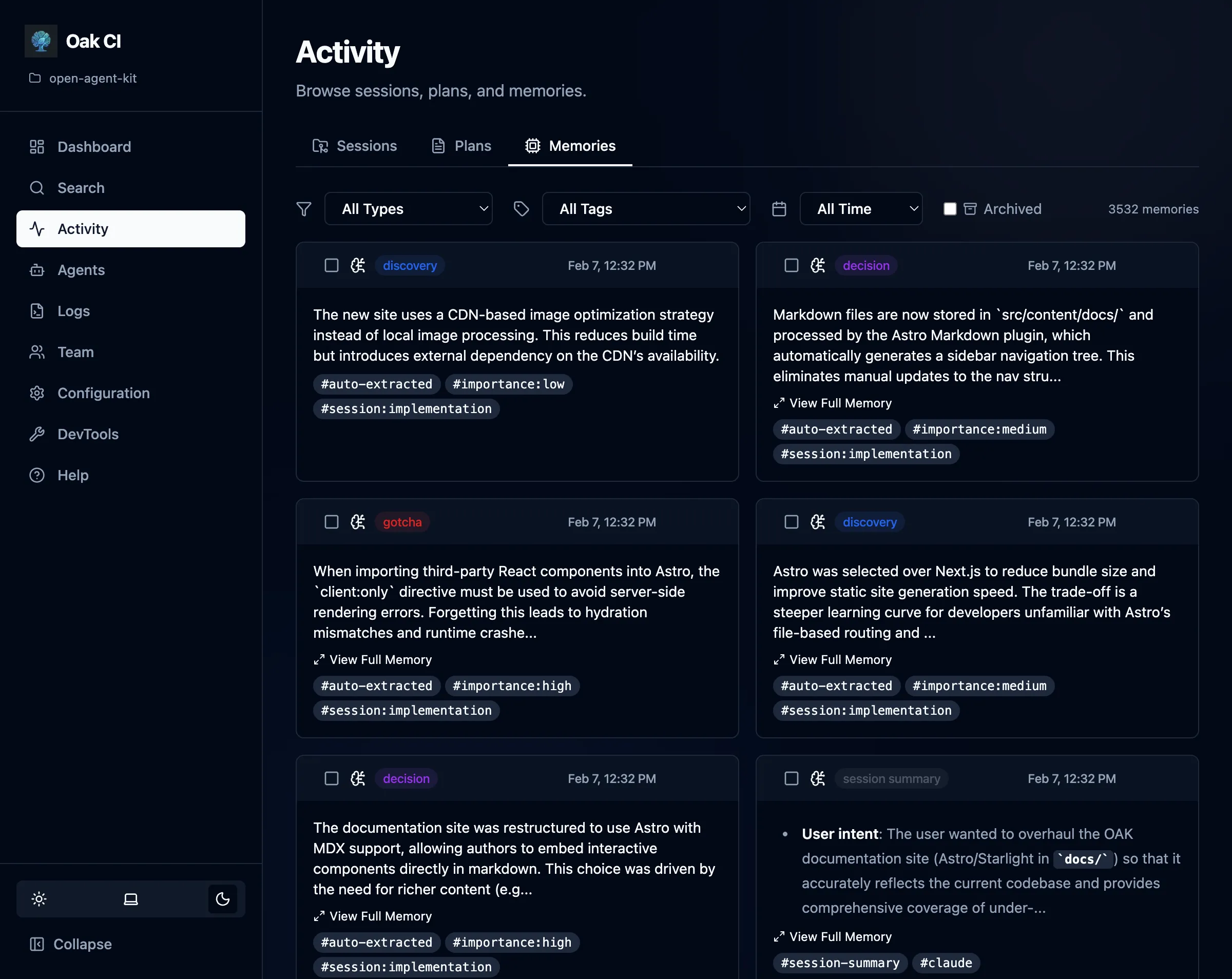
Agents can also store memories programmatically using the MCP tools. See MCP Tools for details on oak_remember.
Rebuilding Memory Embeddings
Section titled “Rebuilding Memory Embeddings”If you change embedding models, rebuild the memory index from the dashboard’s DevTools page — click Rebuild Memories to re-embed all observations from SQLite into ChromaDB.
Agent Hooks API
Section titled “Agent Hooks API”If you are building your own tools or agent integrations, you can hit the hook endpoints directly:
POST /api/oak/ci/hooks/session/start{ "agent": "custom-agent", "project_path": "/path/to/project"}See the API Reference for more details.