The Complete Development Record
Every plan, decision, gotcha, and trade-off is recorded automatically as your agents work — creating a development history that’s semantically richer than git blame could ever be.
When AI agents build your software, every session produces plans, architectural decisions, trade-offs, and hard-won lessons. But all of that context vanishes when the session ends — leaving you with code changes and a git diff that can never tell the full story.
OAK captures what git can’t.
The Complete Development Record
Every plan, decision, gotcha, and trade-off is recorded automatically as your agents work — creating a development history that’s semantically richer than git blame could ever be.
Semantic Code Search
Agents find code by concept (“where is auth?”) rather than just regex, using AST-aware indexing across 13 languages and vector embeddings.
Context That Follows You
Relevant memories and code context are automatically injected into every agent session — preventing regressive bugs and circular conversations across your entire team.
Autonomous Agents
OAK Agents turn captured intelligence into action — generating documentation, surfacing insights, and improving your codebase using everything OAK has learned.
Install OAK
# macOS / Linuxcurl -fsSL https://raw.githubusercontent.com/goondocks-co/open-agent-kit/main/install.sh | sh
# Or via pipx (recommended)pipx install oak-ci
# Or via uvuv tool install oak-ci
Initialize your project
cd your-projectoak init # Interactive mode — pick your agent(s) and languagesStart the daemon and open the dashboard
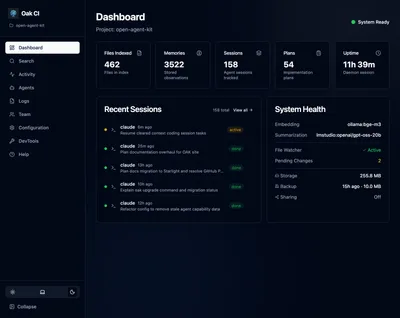
oak ci start --openThe dashboard opens in your browser. From here, you can configure embedding models, browse sessions, search your codebase, and manage memories — all from the UI.
That’s it! OAK is now running. The dashboard is your primary interface — use it to configure settings, explore agent activity, search code, and manage project memory. The CLI is only needed for setup and maintenance tasks.