
DevTools
The DevTools page provides power-user capabilities for managing the Codebase Intelligence backend. Open it from the sidebar in the Dashboard.
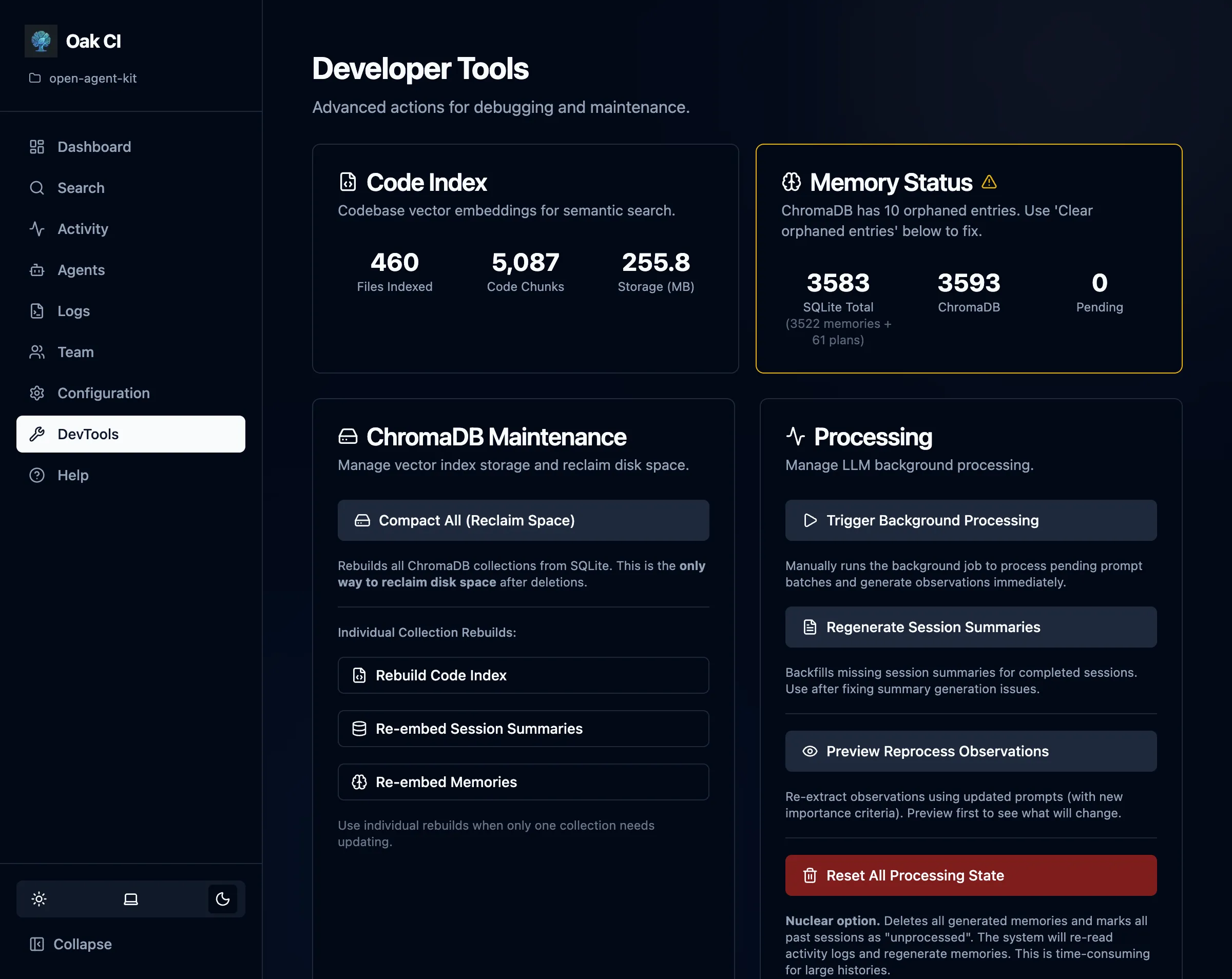
Stats at a Glance
Section titled “Stats at a Glance”The top of the DevTools page shows sync status between your two data stores:
| Metric | Description |
|---|---|
| SQLite chunks | Total code chunks in the source-of-truth database |
| ChromaDB chunks | Total vectors in the search index |
| Sync status | Whether SQLite and ChromaDB counts match |
| Memory count | Total stored observations |
| Orphan detection | Vectors in ChromaDB with no matching SQLite record |
When SQLite and ChromaDB are out of sync, the stats highlight the discrepancy so you know a rebuild is needed.
Maintenance Tasks
Section titled “Maintenance Tasks”Rebuild Index
Section titled “Rebuild Index”Triggers a full wipe and rebuild of the codebase index (vector store). This does not delete memories — only code chunks are re-indexed.
Use this when:
- Files have been renamed or moved and search results feel stale
- You changed the AST parser configuration
- The index was corrupted
Reset Processing
Section titled “Reset Processing”Resets the “processed” flags for sessions, prompt batches, and activities. This allows background workers to pick them up again — useful if you’ve changed the summarization model and want to re-summarize past sessions.
Options:
- Delete memories — Also removes generated memory observations, allowing them to be regenerated from raw session data
Reprocess Observations
Section titled “Reprocess Observations”Re-runs the observation extraction pipeline on prompt batches that have already been processed. Useful after improving the extraction prompts or switching to a better LLM.
Supports dry-run mode — preview which batches would be reprocessed without actually doing it.
Compact ChromaDB
Section titled “Compact ChromaDB”Deletes and rebuilds the entire ChromaDB collection. This is a more thorough version of Rebuild Index that also handles orphaned vectors and stale embeddings.
Database Maintenance
Section titled “Database Maintenance”Runs SQLite and ChromaDB housekeeping:
- VACUUM — Reclaims disk space from deleted records
- ANALYZE — Updates query planner statistics
- FTS optimize — Rebuilds full-text search indexes
- Integrity check — Verifies database consistency
Regenerate Summaries
Section titled “Regenerate Summaries”Re-generates missing session summaries. Useful after restoring from a backup that didn’t include summaries, or after switching summarization models.
Cleanup Minimal Sessions
Section titled “Cleanup Minimal Sessions”Removes low-quality sessions that have too few activities to be useful. Helps keep the session list clean and focused on meaningful work.
Trigger Processing
Section titled “Trigger Processing”Manually kicks the background worker loop for immediate processing without waiting for the scheduled interval.
Rebuild Memories
Section titled “Rebuild Memories”Re-embeds existing memory text from SQLite into ChromaDB. Use this when:
- You switched embedding providers (to match the vector space of the new model)
- The vector store was corrupted or deleted, but the SQLite data is intact
CLI Shortcuts
Section titled “CLI Shortcuts”A few DevTools actions are also available from the terminal:
oak ci index --force # Rebuild the entire code indexoak ci reset # Reset the entire system (data + index)When to Use Each Tool
Section titled “When to Use Each Tool”| Situation | Tool |
|---|---|
| Search results feel stale | Rebuild Index |
| Changed embedding model | Rebuild Memories |
| Changed summarization model | Reset Processing → Trigger Processing |
| Database seems large | Database Maintenance (VACUUM) |
| ChromaDB out of sync | Compact ChromaDB |
| Missing session summaries | Regenerate Summaries |
| Too many trivial sessions | Cleanup Minimal Sessions |
| Want to re-extract observations | Reprocess Observations (use dry-run first) |