
Configuration
The Configuration page is where you set up everything the daemon needs to function at full capability. Models must be configured for embedding and (optionally) summarization before CI can provide semantic search and session summaries.
Open it from the dashboard sidebar, or navigate to http://localhost:{port}/config.
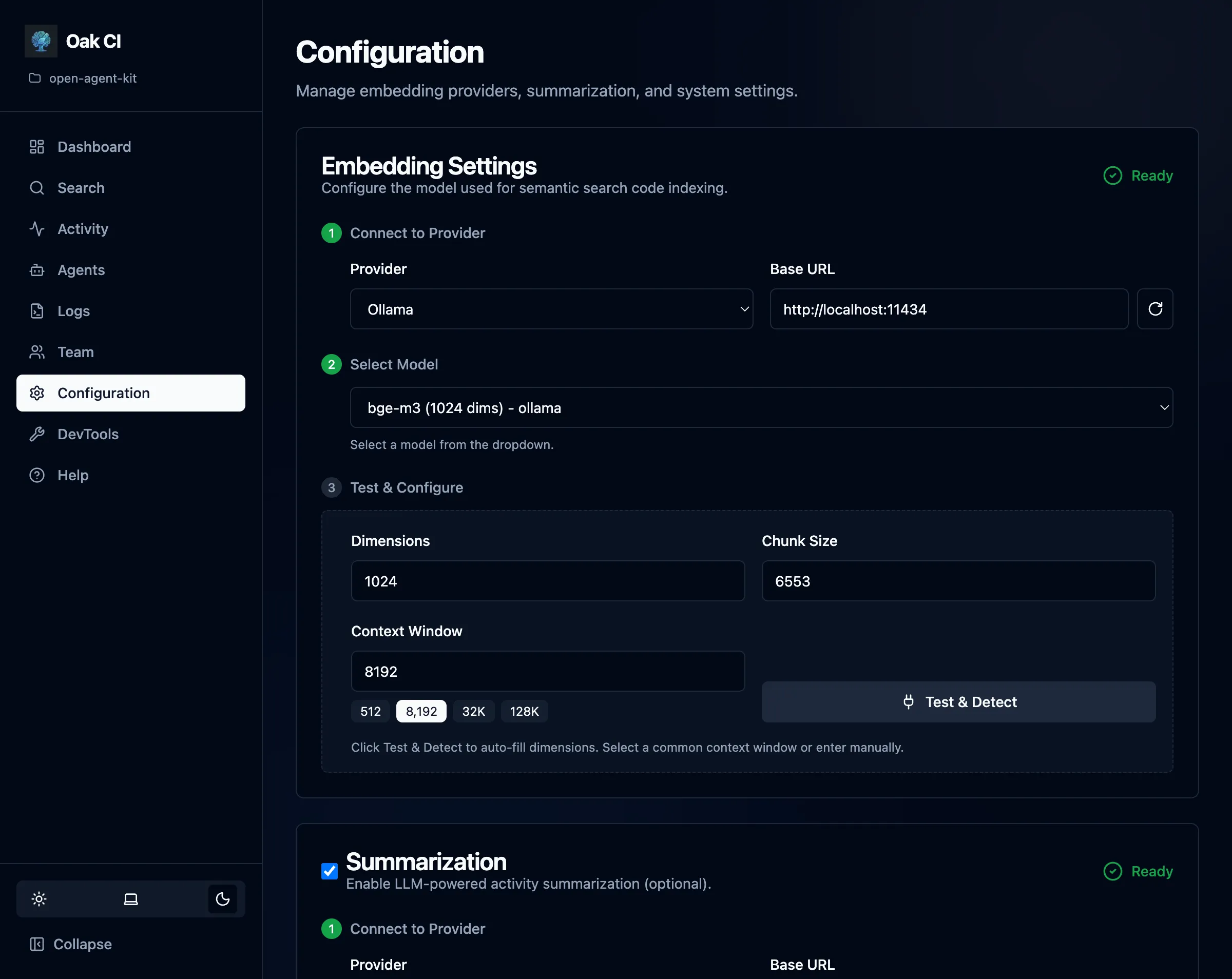
Models
Section titled “Models”Models are the engine behind CI’s semantic search and session summaries. You need at least an embedding model for code search. A summarization model is optional but highly recommended for session summaries, titles, and memory extraction.
Providers
Section titled “Providers”OAK supports any local provider with an OpenAI-compatible API:
| Provider | Default URL | Notes |
|---|---|---|
| Ollama | http://localhost:11434 | Most popular choice. Free, easy to set up. |
| LM Studio | http://localhost:1234 | Desktop app with a visual model browser. |
| Custom | Any URL | Any OpenAI-compatible endpoint (vLLM, llama.cpp, etc.) |
Setup steps:
- Select your provider or enter a custom URL
- The UI fetches available models from the provider
- Select a model
- Click Test & Detect — OAK auto-detects dimensions and context window
- Save the configuration
Embedding Models
Section titled “Embedding Models”Embedding models convert code and text into vectors for semantic search. You need one running before CI can index your codebase.
Recommended models for Ollama:
| Model | Dimensions | Context | Size | Pull Command |
|---|---|---|---|---|
| nomic-embed-text | 768 | 8K | ~270 MB | ollama pull nomic-embed-text |
| bge-m3 | 1024 | 8K | ~1.2 GB | ollama pull bge-m3 |
| nomic-embed-code | 768 | 8K | ~270 MB | ollama pull nomic-embed-code |
For LM Studio: Search the Discover tab for nomic-embed-text-v1.5 or bge-m3 and download.
For the full list of models OAK recognizes, run:
oak ci config --list-modelsSummarization Models
Section titled “Summarization Models”Summarization uses a general-purpose LLM (not an embedding model) to generate session summaries, titles, and extract memory observations. This is a separate configuration from embeddings — you can use different providers or models for each.
Recommended models for Ollama:
| Model | Resource Level | Context | Size | Pull Command |
|---|---|---|---|---|
| gemma3:4b | Low (8 GB RAM) | 8K | ~3 GB | ollama pull gemma3:4b |
| gpt-oss:20b | Medium (16 GB RAM) | 32K | ~12 GB | ollama pull gpt-oss:20b |
| qwen3:8b | Medium (16 GB RAM) | 32K | ~5 GB | ollama pull qwen3:8b |
| qwen3-coder:30b | High (32+ GB RAM) | 32K | ~18 GB | ollama pull qwen3-coder:30b |
For LM Studio: Search the Discover tab for any of the models above and download. Make sure to start the local server with your chosen model loaded.
To see what summarization models are available from your provider:
oak ci config --list-sum-modelsContext Window Tips
Section titled “Context Window Tips”Local models often default to small context windows that limit summarization quality. The context window determines how much of a session the model can “see” at once.
- Ollama: Default
num_ctxis typically 2048 tokens. For better summaries, increase it:Terminal window # Create a Modelfile with larger contextecho 'FROM gemma3:4bPARAMETER num_ctx 8192' > Modelfileollama create gemma3-4b-8k -f Modelfile - LM Studio: Check the model’s context length in the UI settings and increase if needed.
Higher context windows = better summaries, but more memory usage. 8K is a good minimum for summarization. Models like qwen3:8b support up to 32K natively.
You can also auto-detect and set the context window via CLI:
oak ci config --sum-context auto # Auto-detect from provideroak ci config --sum-context 8192 # Set explicitlyoak ci config --sum-context show # Show current settingExternal Resources
Section titled “External Resources”- Ollama Model Library — Browse all available models
- Ollama Embedding Models — Filter for embedding-specific models
- LM Studio — Desktop app for browsing and running local models
- llama.cpp — High-performance C++ inference engine; use its OpenAI-compatible server as a custom provider
- MTEB Leaderboard — Benchmark for comparing embedding model quality
Backup Settings
Section titled “Backup Settings”Configure automatic backups and related policies from the Teams page or via the configuration file. See Teams — Automatic Backups for the full guide.
| Setting | Config Key | Default | Description |
|---|---|---|---|
| Automatic backups | backup.auto_enabled | false | Enable periodic automatic backups |
| Include activities | backup.include_activities | true | Include the activities table in backups |
| Backup interval | backup.interval_minutes | 30 | Minutes between automatic backups (5–1440) |
| Backup before upgrade | backup.on_upgrade | true | Create a backup before oak upgrade |
Backup settings are per-machine (stored in .oak/config.{machine_id}.yaml), except on_upgrade which is project-level (stored in .oak/config.yaml).
# Per-machine backup settingscodebase_intelligence: backup: auto_enabled: true include_activities: true interval_minutes: 30# Project-level backup settings (in .oak/config.yaml)codebase_intelligence: backup: on_upgrade: trueSession Quality
Section titled “Session Quality”Control when background jobs process sessions:
| Setting | Description | Default |
|---|---|---|
| min_activities | Minimum activity count before a session qualifies for background processing | Varies |
| stale_timeout | How long (in seconds) an inactive session sits before cleanup | Varies |
- Higher
min_activities= only substantial sessions get summarized (reduces noise) - Lower
stale_timeout= sessions are cleaned up faster (more responsive, but may cut off sessions that pause briefly)
Logging
Section titled “Logging”Configure log rotation to manage disk usage:
| Setting | Description |
|---|---|
| Max file size | Maximum size of each log file before rotation |
| Backup count | Number of rotated log files to keep |
See the Logs page for details on viewing and filtering logs.
Directory Exclusions
Section titled “Directory Exclusions”Control which directories are skipped during codebase indexing.
Built-in Exclusions
Section titled “Built-in Exclusions”OAK includes sensible defaults out of the box:
.git,node_modules,__pycache__,.venv,venvdist,build,.next,.nuxt- And other common build/dependency directories
OAK also respects your project’s .gitignore — anything gitignored is automatically excluded from indexing.
Custom Exclusions
Section titled “Custom Exclusions”Add your own patterns from the Configuration page. Patterns use glob syntax (e.g., vendor/**, generated/**). Custom exclusions are saved to the daemon’s configuration file.
Reset to Defaults
Section titled “Reset to Defaults”If you’ve added patterns you no longer need, use the Reset to Defaults button to restore the built-in exclusion list.
Test & Detect
Section titled “Test & Detect”The Test & Detect buttons on the Configuration page let you verify your provider setup:
- Test connection — Verifies the provider URL is reachable and the model exists
- Auto-detect dimensions — Sends a test embedding to determine the model’s vector dimensions
- Discover context window — Probes the model to find its maximum context length
This saves you from having to look up model specifications manually.